
Glaze chemistry is one of pottery’s most genuinely unpredictable elements; two glazes that look nearly identical in their raw state can emerge from a kiln looking completely different depending on temperature, application thickness, and how they interact in the firing process.
Dreamina’s AI image generator gives potters a real way to visualize a desired glaze effect before committing actual time and materials to testing it in the kiln.
Dreamina, powered by its advanced Seedream 5.0 Pro image generation model, handles this kind of organic, texture-rich surface design with real visual nuance. Here’s how to turn a glaze concept into something worth testing.
Understanding glaze’s inherently organic visual character
Unlike a painted surface, glaze moves and pools during firing, thicker in recesses, thinner on raised areas, sometimes crackling or crystallizing in genuinely unpredictable ways. The way molten glaze flows and collects on different pottery forms is also explained in Digitalfire’s guide to fluid melt glazes.
Designing with this organic, flowing quality in mind, rather than a flat, even color application, produces a concept that actually reflects how real glaze behaves.
Glaze effects worth exploring visually
A handful of distinctive glaze characteristics offer strong creative starting points:
- Crystalline glazes with sharp, frost-like crystal formations
- Crackle glazes with fine, web-like surface fracturing
- Drip and pooling effects showing gravity’s pull during firing
- Reactive glazes where two colors blend and break unpredictably at their edges
Designing for the actual form the glaze will cover
Since glaze behaves differently depending on a piece’s shape, pooling in a bowl’s interior curve, dripping down a vase’s vertical walls, describing both the glaze effect and the specific pottery form together keeps the concept genuinely relevant to a real piece you’re planning to make.
Your 3-step glaze concept build with Dreamina
Step 1: Write a text prompt
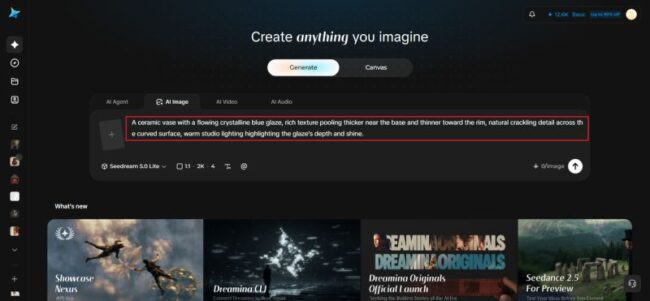
Navigate to Dreamina and write a detailed text prompt describing your chosen pottery form with a specific glaze effect applied, including how the glaze should pool, crackle, or flow across the surface.
A strong sample prompt might read: A ceramic vase with a flowing crystalline blue glaze, rich texture pooling thicker near the base and thinner toward the rim, natural crackling detail across the curved surface, warm studio lighting highlighting the glaze’s depth and shine.
Describing the glaze’s actual physical behavior across the form is what makes the concept genuinely useful for real studio testing.
Step 2: Adjust parameters and generate
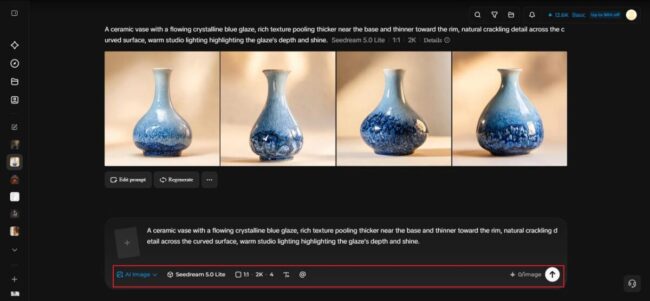
Before generating, set your parameters. Choose your model: Image 5.0 Pro by Seedream 5.0 Pro handles organic texture and realistic surface sheen particularly well; then select your aspect ratio, image size, and resolution, using a portrait ratio to showcase the full form and 2K resolution to preserve fine glaze texture detail. Click Dreamina’s generate icon to produce your glaze concept.
Step 3: Customize and download
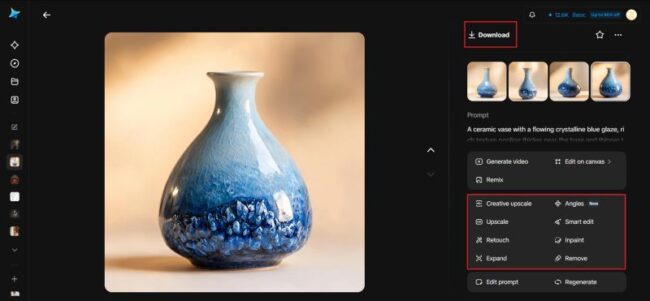
Once your concept generates, refine it using Dreamina’s AI customization tools — inpaint to adjust specific pooling or crackling detail, expand to reveal more of the piece’s form, remove to simplify any overly busy area, and retouch to strengthen overall glaze depth and realism. When the concept feels genuinely worth testing, click the Download icon to save it.
The same principle of refining an existing visual rather than starting from scratch is explored in Image To Image For Concert Poster Restyles, where AI tools are used to adjust visual elements while preserving the original composition.
Testing multiple glaze directions on the same form
Since the same pottery shape can carry dramatically different finished looks depending on glaze choice, generating several distinct glaze concepts on an identical form, crystalline blue, reactive copper-green, matte crackle white, lets you compare options directly before committing kiln time to any single direction.
Where glaze concept visualization earns real studio value
This kind of pre-firing visual planning delivers genuine practical benefits:
- Independent potters reducing wasted test firings and materials
- Ceramic studio client consultations and custom commission planning
- Pottery workshop and course curriculum development
- Portfolio and gallery submission concept presentations
Seedream 5.0 Pro’s strengths for organic surface rendering
As Dreamina’s newest and most capable model, Seedream 5.0 Pro offers genuine advantages for this kind of unpredictable, organic texture work.
Its deep reasoning generation considers how glaze should realistically pool and flow across a curved form’s actual geometry before rendering, helping the result feel physically grounded rather than like a flat texture simply wrapped over a shape.
Its 2K output also preserves the fine crystalline or crackled detail that gives a convincing glaze concept its genuine visual depth.
Building a cohesive glaze palette across a full collection
For potters, developing a signature style, applying the same glaze language, a consistent color family, a recurring texture effect across several different forms creates a genuinely cohesive body of work worth presenting as one collection.
Final thoughts
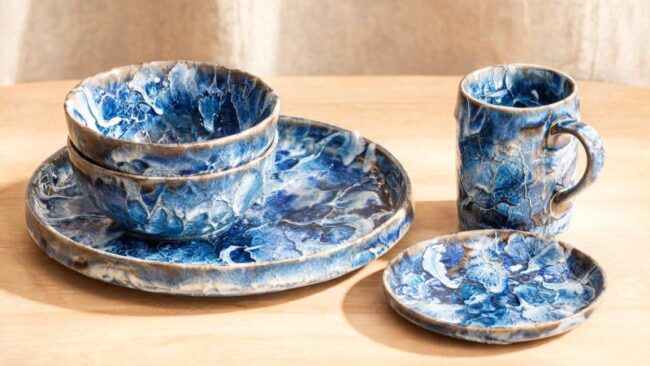
Glaze’s genuine unpredictability becomes far easier to plan around once a concept can actually be visualized first, and Dreamina’s AI image generator makes that kind of informed experimentation achievable before firing a single test tile.
With Dreamina and its advanced Seedream 5.0 Pro image generation model, a glaze’s organic pooling and texture can take real visual shape.
Think in terms of actual glaze behavior, test several directions digitally first, and let Dreamina help you walk into the studio with a clearer sense of what’s about to come out of the kiln.